
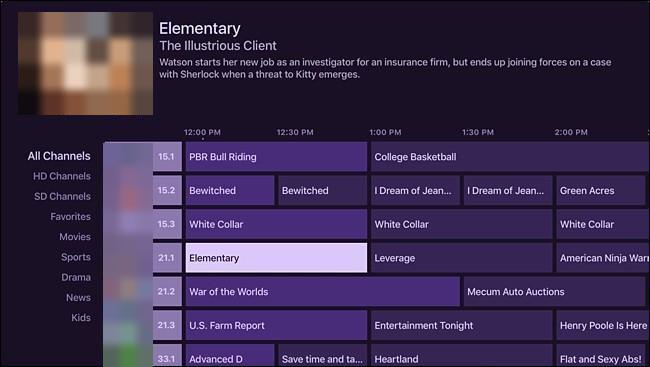
If you are working out how to launch a FAST channel, the short answer is this: secure the rights to a library, turn it into a scheduled linear stream, insert ads on the server, publish a program guide and distribute the channel through your own apps and through FAST platforms. FAST stands for free ad-supported streaming TV. The viewer pays nothing, and you earn from the ads in the breaks. This guide takes the steps in order and flags where plans usually go wrong.
What a FAST channel is
A FAST channel behaves like a traditional TV channel. It plays on a schedule, viewers tune in rather than pick a title, and ads run in breaks. The difference is that it is delivered over the internet to connected TVs, phones and the web, with no cable box.
Each channel has the same moving parts: content, a playout system that builds the linear stream, an ad system, a program guide (EPG) and one or more places for viewers to find it. The steps below follow that order.
Step 1: Settle content rights and library size
Everything starts with what you are allowed to stream. Check that your license covers:
- Ad-supported streaming, not only subscription or download.
- The territories where you want viewers, such as the US or worldwide.
- The devices and platforms you plan to use.
- The term, and whether you can include the content in a looping schedule.
Library size matters because a linear channel repeats. Too few hours and viewers see the same episode all week. Platforms set their own expectations on catalog depth, so ask each one before you commit. Series and themed collections work well because viewers return for the next episode.
Step 2: Build the schedule and set up cloud playout
Playout turns files into a continuous live stream. A cloud playout service holds your library, follows a schedule you set, places ad breaks and outputs an HLS stream that distribution partners can pick up.
Plan these decisions up front:
- Programming blocks. Group content by theme or time of day.
- Break positions. Mark ad breaks in the content ahead of time, so they fall at natural pauses.
- Fillers. Bumpers and promos cover gaps so the channel never goes dark.
- Backup. Decide what plays if a file is missing or an ingest fails.
Linear streaming is part of our live streaming solutions work.
Step 3: Add server-side ad insertion
Server-side ad insertion (SSAI) stitches ads into the stream before it leaves the server. Viewers see one continuous video, so there is no buffering at the break, and ad blockers cannot remove the ads. Your ad server or a supply-side platform fills each break through a standard ad-decisioning call.
SSAI also supports reporting: you can see which ads played, how many viewers saw them and how long they watched. Pick the ad tools early, because they decide how your stream is built and what data you can sell.
Step 4: Prepare EPG data
The electronic program guide tells viewers and platforms what is playing and what comes next. For each program you supply a title, description, start and end times, and artwork, usually as a feed that platforms read on a schedule. Accurate EPG data makes channels easier to browse and helps the platform’s search. Keep descriptions unique and specific, and keep the feed in sync with your schedule, since a wrong guide is one of the quickest ways to lose viewers.
Step 5: Choose where to distribute
You have two routes, and most publishers use both.
| Your own apps | FAST platforms | |
|---|---|---|
| Examples | Roku, Fire TV and Samsung apps | The Roku Channel, Samsung TV Plus, Pluto TV |
| Audience | You bring it | The platform already has it |
| Data and branding | You keep both | The platform controls most of it |
| Ad revenue | You sell and keep it, or use an ad partner | Shared under the platform’s terms |
| Effort | Build and certify apps | Apply and deliver a compliant stream |
Your own apps give you the relationship with viewers. Our Roku channel development work builds channels with live TV, a guide and scheduled ad breaks. FAST platforms give you reach quickly, but each has its own onboarding process and terms, so read them directly from the platform. We do not describe their rules here because they change.
Step 6: Sell ads and connect to SSPs
Revenue comes from filling the breaks. You can sell ads directly, work with an ad network or connect a supply-side platform (SSP) that auctions your inventory to many buyers. Direct sales earn more per ad but need a sales team. SSPs fill more of the break with less effort. Many channels begin with an SSP and add direct deals once they have audience data to show. Keep the number of breaks and their length viewer-friendly: too many ads send people to another channel.
Step 7: Measure and improve
Track these from day one:
- Viewing hours and average watch time per channel and per program.
- Ad impressions and fill rate, which show how much inventory you sold.
- Drop-off points, such as viewers leaving at a break.
- Platform differences: the same channel can perform very differently on each device.
Use the results to reorder the schedule, trim weak programs and adjust break placement. Treat the first few months as a test.
A sensible launch plan
- Confirm rights and gather the library.
- Choose playout, ad and EPG tools.
- Launch on one of your own apps, such as Roku, to test the full chain.
- Apply to one or two FAST platforms with a stable, tested stream.
- Add ad partners and measure.
- Expand to more platforms.
Where Total VDO fits
We build the technical pieces: Roku, Fire TV and Samsung apps, the live pipeline and the ad integrations. See our Roku channel development and live streaming solutions pages for how we work, and contact us to talk through your channel plan.