What we build
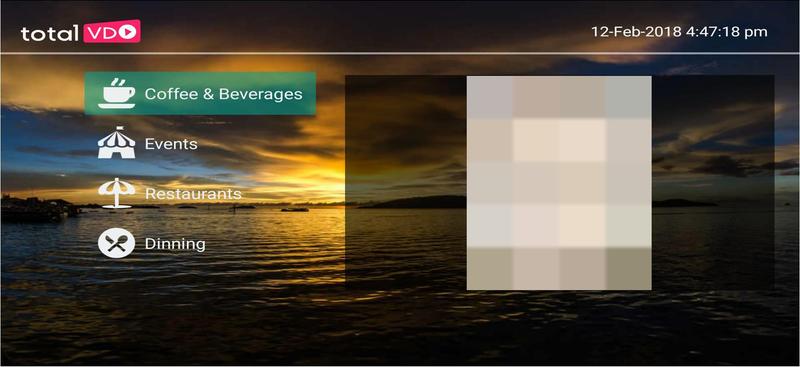
Welcome screens
A personal greeting with the guest's name, room details, hotel offers, Wi-Fi details and weather when the TV turns on.
Channel lineups
Live channels and on-demand content organized by language and guest type, changed from a web console.
Hotel services and room service
Menus for dining, spa, housekeeping and late checkout that guests browse by remote and the front desk receives.
Casting from guest phones
Guests send photos, video and streaming apps from their phone to the TV without a cable or an app download.
PMS integration
Check-in data populates welcome screens, and check-out clears the room, so staff do not update TVs by hand.
Existing TV upgrade
A set-top device or TV app brings the system to the TVs you already own, which avoids a full replacement.
Hospital patient TV
Patient room screens with education videos, entertainment, meal and request menus, and nurse-call links.
Applications we build
Food, hospitality and local services
- Online food ordering system
- Food supply and kitchen management
- Hotel management system
- Gym management system
- Salon management system
- Cyber cafe management system
- Tailoring management system
See the application catalog What you get
- A branded welcome and services screen on every in-room TV
- Room service and extras ordered from the sofa, with fewer calls to the front desk
- Existing TVs kept in service, which lowers hardware spend
- One console to update every room, floor or property
What guests and hospitals expect from a room TV
A guest walks in and the TV shows a generic logo. A good hotel IPTV solution shows their name, the Wi-Fi password,
tonight’s dinner hours and a way to order a coffee, all on the remote. For the hotel, it is the one screen in the
room that every guest looks at.
The same logic applies to patient rooms: a TV that explains the stay, shows approved education videos and takes
simple requests lowers stress for patients and calls to the nurses’ station.
What the system includes
- Welcome and brand. A start screen per room with guest details, offers and hotel information.
- Channels and on-demand. Live lineups, local channels, hotel videos and streaming apps, set per language or
room type.
- Services and menus. Room service, spa, housekeeping and concierge requests routed to the right department.
- Casting. Guests cast from their own devices, room by room.
- PMS link. Check-in and check-out update each screen automatically.
- Console. Staff manage content, rooms and reports from a browser.
Upgrading the TVs you already have
Replacing every set in a hotel is the biggest cost in most IPTV quotes. We avoid it where we can. On supported
Samsung, LG and Android TVs the system runs as an app. On other models, a small set-top box connects behind the TV.
We apply the same smart TV app development skills we use for broadcasters,
including Samsung Tizen and LG webOS apps, and the streaming back end comes from our
OTT platform development work.
Why Total VDO for hotel and hospital TV
TV apps and streaming are our main business, and hotel IPTV is that work in a different setting. The screens in
lobbies and corridors can run on our digital signage software with the same
console. For hospitals, see our healthcare software development solutions. Tell
us your room count, TV models and PMS, and we will outline how to bring the system to your property.
A typical rollout starts with a pilot floor. We install, test casting and PMS updates with real guests, then extend to the rest of the property. Staff training is short because the console is a browser page, and updates to menus and offers take minutes. We can also support multi-property groups from one login.
How a project runs
-
Scope
A short call and a written scope: what we build, for which platforms, the schedule and a fixed estimate.
-
Design
Screens for web, mobile and the 10-foot TV view, reviewed with you before any code is written.
-
Build
Two-week sprints with a working demo at the end of each, in a repository you own.
-
Launch
Testing on real devices, store submissions and certification, then a monitored go-live.
-
Run
Monitoring, updates and new features on a monthly plan, or a documented handover to your team.
Frequently asked questions
Do we have to replace our TVs?
Usually no. We can run the system through a small set-top box or a TV app on supported Samsung, LG and Android TVs. We check your TV models and cabling before quoting the approach.
Which property management systems can you connect to?
We connect through the PMS vendor's API or a standard interface to pull guest name, room and stay dates. We confirm your PMS and its integration options during scoping.
How does casting from a guest phone work?
The guest connects to the hotel Wi-Fi and sends content to the room TV using Chromecast or Miracast style casting. Each room stays separate, so one guest never casts onto another's screen.
Can the same system run in a hospital?
Yes. A hospital patient TV uses the same platform with different content: education videos, meal and request menus, and entertainment. Our healthcare solutions page covers the wider system.
Who updates the content?
Your staff do, from a web console. Change a welcome message, a channel list or a menu once and it reaches every room or only the floor or property you select.