The brief
A professional association in the property sector collects leads from several landing pages. The people who fill in those forms are very different: homeowners, property managers, insurance companies, buyers, attorneys, real estate professionals and commercial property owners. Each group needs a different first message, and a homeowner should never receive the email written for an attorney.
The association asked us for GoHighLevel lead nurture automation that would sort every new lead by audience type the moment the form arrives, follow up by email straight away, and give leads a way to continue the conversation on Instagram.
What we built
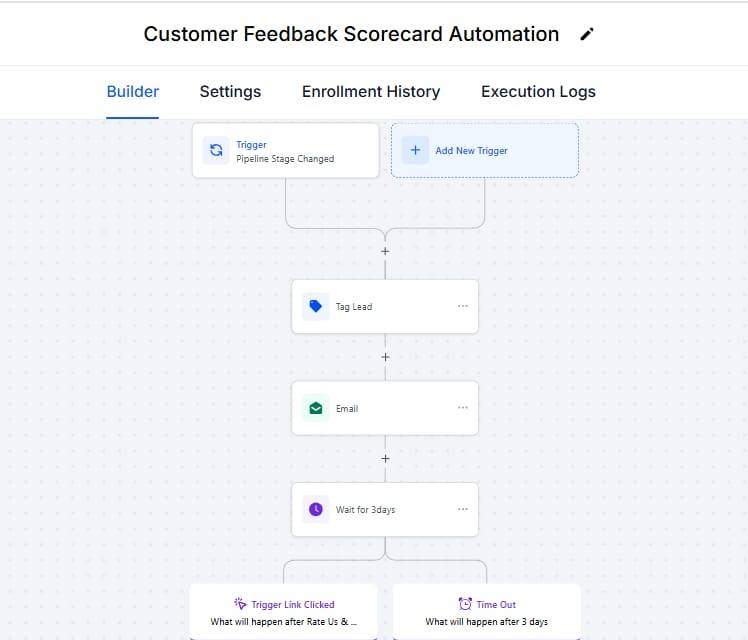
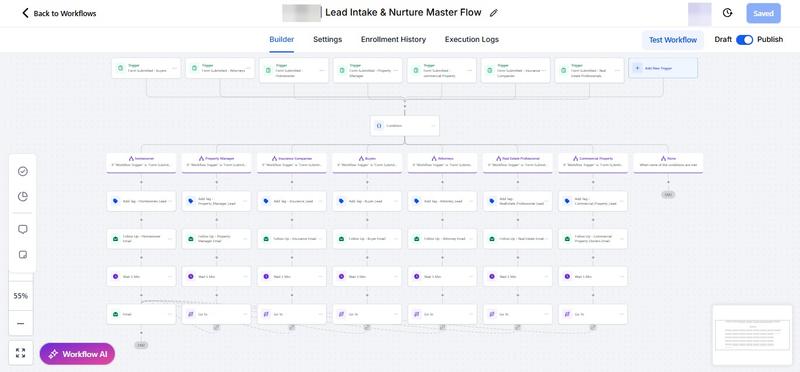
One master flow for every form. We set up a single Lead Intake and Nurture Master Flow in GoHighLevel. Each of the association’s landing page forms triggers it, so there is one place to see and change the logic instead of a separate workflow per page.
Sorting by audience type. When a form is submitted, the flow recognises which audience the lead belongs to and sends them down their own branch, one branch per audience.
Tags that say who the lead is. Each branch tags the contact straight away, for example Homeowner_Lead, Buyer_Lead or Attorney_Lead. The team can filter, report on and message each group from those tags later.
A first email written for each audience. The lead immediately receives a thank-you email that speaks to their situation: a homeowner gets the homeowner version, a buyer gets a note about buying with confidence, and an attorney gets an email about litigation support.
A second email that opens Instagram. After a short delay, a second email invites the lead to connect with the association on Instagram. It links to the account and explains how to send a quick DM with a keyword such as “Start”.
ManyChat for the Instagram side. When a lead sends that keyword, ManyChat subscribes them, and from then on they receive guided messages, updates and reminders directly in their Instagram inbox.
How it works
The flow is built from GoHighLevel’s own pieces: form triggers, a condition step that reads the audience type, tags, wait steps and email actions. ManyChat runs the Instagram conversation, so the association gains a social channel without moving its contact list anywhere else. Because every branch has the same shape, adding another audience later means copying a branch and writing its emails, not rebuilding the flow.
Our GoHighLevel services cover builds like this one, and our CRM automation team does the same work in HubSpot, Zoho and Salesforce. For agencies and brokers, our real estate software page shows the wider systems we build around property leads.
Planning a nurture flow for several audiences
Start from the forms, not the emails. Decide how each form tells you who the lead is: a hidden field on each landing page, a dropdown, or a separate form per audience. If that answer is unreliable, every message after it goes to the wrong person.
Next, name the tags before you build anything, and use one pattern for all of them, so reports and later campaigns can find each group without guesswork. Write the first email for each audience before the second one: it answers why the lead filled in the form, so it should give them what they came for. Only then add a second channel such as Instagram, and make it an invitation the lead can accept rather than something that happens to them.
The result
Every lead from the association’s landing pages is sorted by audience type and tagged the moment the form arrives, and the follow-up each one receives matches who they are. Leads get an email nurture straight away and the option to move into an Instagram conversation through ManyChat. All of it stays organised in one GoHighLevel database, while the conversations happen in more than one channel.
If your leads come from several kinds of customer and all get the same email today, tell us who they are and we will show you how the flow would look.